
Fix a mistake in a flight
For: Pilots · Hangar admins
pilotadminedit flight · correct flight · wrong hobbs · typo · delete flight · change pilot · reprice · cost override
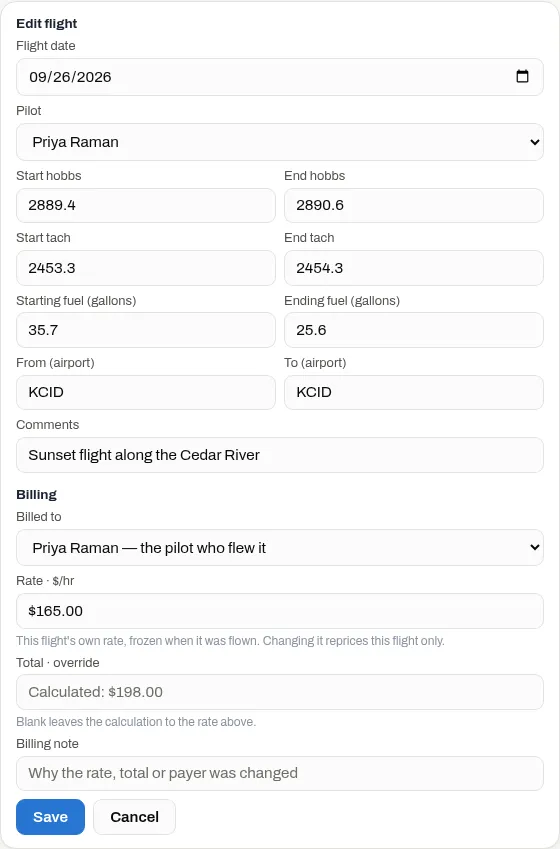
You can correct your own flights in the Logbook. A hangar admin can correct anyone’s, and is the only one who can change what a flight costs.
- Open Logbook and find the flight.
- Press its ⋯ menu, then Edit flight.
- Change what’s wrong and press Save.
Who can change what
Section titled “Who can change what”| Pilot, on their own flights | Hangar admin, on any flight | |
|---|---|---|
| Flight date, Start hobbs, End hobbs, Start tach, End tach | Yes | Yes |
| Starting fuel (gallons), Ending fuel (gallons), From (airport), To (airport), Comments | Yes | Yes |
| Split flight, Delete flight | Yes | Yes |
| Pilot (who flew it) | No | Yes |
| Billed to, Rate · $/hr, Total · override, Billing note | No | Yes |
| Edit fuel price | No | Yes |
Mechanics can’t change flights.
A pilot can fix the hours, but not the rate they’re multiplied by. Fixing the hobbs on a flight works its cost out again at that flight’s own frozen rate.
Changing what a flight costs (admins)
Section titled “Changing what a flight costs (admins)”The Billing part of Edit flight shows only to admins:
- Billed to: the pilot who flew it, or the hangar for a maintenance run or repositioning leg.
- Rate · $/hr: this flight’s own rate. It only shows under a wet or dry rate. Changing it reprices only this flight, never the aircraft’s rate.
- Total · override: sets the total outright. Leave it blank to go back to the calculated figure.
- Billing note: why you changed it. Under a wet or dry rate, once you’ve set the total, the note shows to anyone who hovers over the flight’s cost.
To change the price per gallon on one flight, use Edit fuel price in the flight’s ⋯ menu, not the Fuel price · $/gal box under Billing, which usually doesn’t change the cost. Edit fuel price only shows when the aircraft’s cost model charges for fuel.
- Press the flight’s ⋯ menu, then Edit fuel price.
- Leave Manual on and type a price, or turn Manual off to use Calculated based on purchase price: the average price of the fuel in the tank when the flight was flown.
- Press Save.
Deleting a flight
Section titled “Deleting a flight”Press ⋯, Delete flight, then Confirm delete. When a flight is deleted:
- Squawks reported with it are kept. They just aren’t tied to a flight any more.
- A fuel purchase it recorded stays in the Logbook, because the fuel really went in.
- Photos attached to the flight are deleted with it.
- A booking it completed on the schedule stays completed.
Things that catch people out
Section titled “Things that catch people out”- Each flight’s readings are its own. Changing one flight’s End hobbs doesn’t move the next flight’s Start hobbs. If the next flight started from the wrong number, fix both flights. Otherwise the space between them shows up as an Unlogged flight.
- The usual rules still apply. An edited flight can’t overlap another flight, its date has to fit the hobbs order, and its ending fuel can’t be more than its starting fuel.
- A fuel purchase can’t be deleted. Correct its numbers with Edit fuel purchase instead. See fuel and receipts.
If something goes wrong
Section titled “If something goes wrong”- There’s no ⋯ menu, or no Edit flight in it. It isn’t your flight. Ask its pilot or an admin to fix it. If there’s no ⋯ menu on any flight, even your own, and a banner says “This hangar is read-only”, nothing can be changed until the hangar’s subscription is fixed. See Start flight was refused.
- “This hobbs range overlaps an existing flight.” The new readings run into the flight before or after. Fix that flight first.
- “This flight is dated … but starts at … hobbs, which is after a flight dated …” (or “… ends at … hobbs, which is before a flight dated …”) The new date doesn’t fit between the flights around it. Check the date or the hobbs readings.
- “end_tach must be greater than start_tach” or “end_fuel_gallons can’t be greater than start_fuel_gallons” Check the pair of readings. The decimal point is added for you, so a dropped digit makes a reading ten times too small.