
Split a flight in two
For: Pilots · Hangar admins
pilotadminSplit a flight when it was really two legs. Maybe you stopped at another airport and logged the trip as one flight, or two pilots each flew part of it. You need the hobbs reading at the point where the first leg ended.
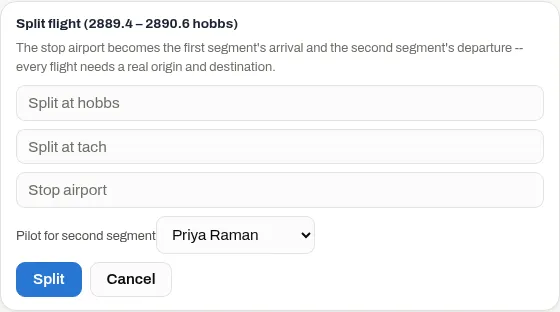
- Open Logbook, press the flight’s ⋯ menu, and then Split flight.
- Enter Split at hobbs, the meter reading where the first leg ended. It has to be between the flight’s start and end readings.
- If the aircraft has a tach meter, enter Split at tach too.
- Enter the Stop airport. It becomes the first leg’s destination and the second leg’s origin.
- Admins only: choose the Pilot for second segment if someone else flew it.
- Press Split.
What you end up with
Section titled “What you end up with”The flight becomes two, both on the original date:
- The first leg runs from the original start to the split reading, from the original departure airport to the stop. It keeps the comments and any squawks, fuel purchases and photos that were attached to the flight.
- The second leg runs from the split reading to the original end, from the stop to the original destination. It carries the ending fuel and all the fuel burned. No reading was taken at the stop, so the burn can’t be divided.
Both legs keep the rate the original flight was costed at, and who it was billed to, so splitting never changes the price to today’s rate. Under Fuel only or a dry rate, the first leg has no fuel figure, so it shows no cost. See what a flight costs.
Who can split
Section titled “Who can split”Pilots can split their own flights, and admins can split any flight. Only an admin can give the second leg to a different pilot.
If an admin splits a flight whose total they set by hand, neither leg keeps that total.
If something goes wrong
Section titled “If something goes wrong”- “split_hobbs must be strictly between … and …” The split reading has to be above the flight’s start and below its end, not equal to either one.
- “split_tach must be strictly between … and …” On an aircraft with a tach meter, Split at tach is needed too, and has to fall inside the flight’s tach readings.
- “A ground-only entry can’t be split” Only real flights can be split.
- “A hangar admin set this flight’s total – ask them to split it” An admin set this flight’s cost by hand. Ask an admin to split it.