
Get on standby for a taken slot
For: Pilots · Hangar admins
pilotadminstandby · waitlist · wait list · queue · sby · taken slot
Standby is a place in line for an aircraft. If a booking inside your window is canceled, shortened or moved away, the first person in line whose window fits is booked into the freed time automatically and told by email.
You join standby from a booking that’s refused because the time is taken:
- On Schedule, press Find a time, then Find openings, and press Book on any opening for the aircraft you want.
- In New reservation, set Date, Start and End to the time you want, even though it’s taken, and press Book it.
- The panel lists “This overlaps another reservation.” Press Add to standby instead.
- The Standby panel opens with your time filled in. Widen Window starts and Window ends if any part of a longer stretch would do.
- Set Shortest slot worth taking. A gap shorter than this is left for whoever is behind you.
- Press Join standby. The message tells you your place in line.
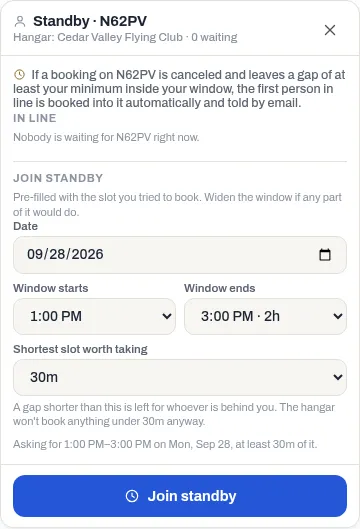
The panel also lists everyone waiting for that aircraft under In line, in the order they joined. An SBY chip in the aircraft’s header on the schedule means someone is waiting, with a count when it’s more than one.
When a slot comes free
Section titled “When a slot comes free”- You’re booked into the largest free stretch inside your window, from its start, for the hangar’s default booking length, or the whole stretch if that’s shorter, but never less than your shortest slot. The booking’s purpose reads Standby.
- You get a “you’re off standby” email. Turn it on or off under Standby came free in Notifications.
- If the new booking would break one of the hangar’s rules for you (for example your weekly hours), or you no longer have access to the aircraft, you’re skipped and the next person gets it.
- Once you’ve been booked, your request is done. A request nobody books ends by itself once its window has passed.
Leave standby
Section titled “Leave standby”The Standby panel opens only the way you joined: try a taken time on that aircraft again (steps 1 to 3) and press Add to standby instead. Then press Withdraw next to your request. A hangar admin can withdraw anyone’s.
If something goes wrong
Section titled “If something goes wrong”- No Add to standby instead button. It’s offered only in the New reservation panel, and only when one of the reasons listed is “This overlaps another reservation.” The New booking box on the grid doesn’t offer it. If the time is refused only for another reason, such as notice or your own limits, standby couldn’t book you into it either. See Book an aircraft.
- A slot came free but someone else got it. The first person in line whose window and shortest slot fit gets it. If you were ahead of them, booking you would have broken one of the hangar’s rules, so you were skipped.